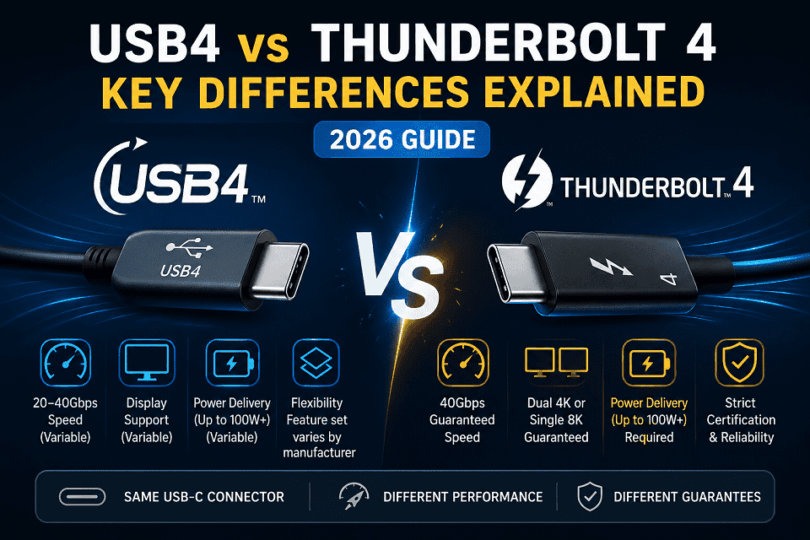

USB4 and Thunderbolt 4 both use USB-C connectors, but the key difference is consistency: Thunderbolt 4 guarantees 40Gbps speed and full feature support, while USB4 allows variable performance depending on the device, ranging from 20Gbps to 40Gbps.
Introduction
USB4 vs Thunderbolt 4 difference explained in this blog post. USB technology is evolving rapidly, and confusion between USB4 and Thunderbolt 4 is common, even among tech enthusiasts. While both standards share similar hardware foundations, their performance guarantees, feature sets, and real-world use cases differ significantly.
This guide breaks down the differences in a clear, technical, yet practical way so you can choose the right standard for your needs in 2026 and beyond.
USB4 is flexible and varies by device, while Thunderbolt 4 guarantees full performance every time.
What is USB4?
Quick Answer
USB4 is a high-speed data transfer standard based on Thunderbolt 3 technology that uses the USB-C connector and supports speeds up to 40 Gbps, but its performance and features can vary by device.
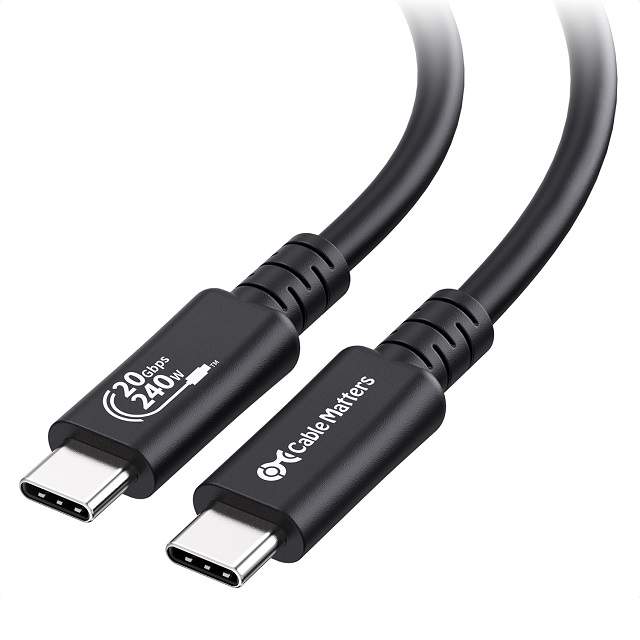 is a modern connection standard designed to handle data, video, and power together. It builds on Thunderbolt 3 technology, so it brings higher speeds and better efficiency.
It uses the USB-C port, which you now see on most new laptops and devices. This makes USB4 widely compatible and easier to use across ecosystems.
USB4 does not work like older USB versions. It can carry different types of data at the same time. This includes file transfer, display output, and charging. It manages bandwidth dynamically, so it adjusts based on what you connect.
USB4 is developed and managed by the USB Implementers Forum. This organization defines open standards for USB technology.
Because USB-IF follows an open approach, manufacturers get flexibility in implementation.
This is why USB4 devices can vary in speed and features.
How USB4 Works in Real Use
USB4 creates a single pathway for multiple tasks. It does not treat data, video, and power separately.
For example:
- You can connect a monitor and transfer files at the same time
- You can charge your laptop while using external storage
- You can use a dock with multiple devices through one port
This makes USB4 useful for modern setups where users want fewer cables.
Key Features of USB4
- Supports speeds up to 40Gbps, but not all devices reach this
- Uses one USB-C port for data, display, and power
- Works with older USB devices and many existing cables
These features make USB4 flexible and widely usable.
Purpose of USB4
USB4 aims to simplify how devices connect and communicate.
It focuses on:
- Reducing the need for multiple ports
- Improving speed for modern workloads
- Supporting high-resolution displays and fast storage
So instead of using different ports, users can rely on one standard.
What USB4 Does Well
USB4 works best for everyday and mixed workloads.
- Handles multiple tasks through one cable
- Works across many devices and brands
- Adapts to different use cases easily
This flexibility is its biggest strength.
Where USB4 Falls Short
USB4 does not guarantee the same experience on every device.
- Some devices support only 20Gbps, not 40Gbps
- Key features like PCIe or display support may be missing
- Performance depends on both device and cable
This variation creates confusion for users.
Quick Summary
USB4 is a flexible and modern standard. It supports high speeds and multiple functions through one port.
But it does not guarantee full performance on every device.
If you want consistency, USB4 may not always deliver the same experience.
What is Thunderbolt 4?
Quick Answer
Thunderbolt 4 is a high-speed connectivity standard that uses USB-C ports and always delivers 40Gbps speed with full feature support, including dual displays, fast data transfer, and reliable performance.
Detailed Explanation:
Thunderbolt 4 is a premium connection standard developed by Intel. It builds on USB4 but adds strict rules for performance and features.
It uses the same USB-C port, so it looks identical to USB4. But the experience is very different. Thunderbolt 4 ensures that every certified device meets the same high standard.
Unlike USB4, Thunderbolt 4 does not allow flexibility in features. Every device must support full capabilities. This includes speed, display output, and data transfer.

Intel enforces strict certification requirements. Every device must meet fixed performance standards.
This is why Thunderbolt 4 delivers consistent speed and features.
How Thunderbolt 4 Works in Real Use
Thunderbolt 4 delivers a consistent experience across devices. It does not depend on manufacturer choices.
For example:
- You can connect two 4K monitors without checking compatibility
- You can use high-speed external SSDs with full performance
- You can connect a dock and run multiple devices smoothly
This makes it reliable for professional setups.
Key Features of Thunderbolt 4
- Always supports 40Gbps speed across all certified devices
- Supports dual 4K or one 8K display without compromise
- Includes mandatory PCIe support for fast storage and accessories
These features ensure predictable performance.
Purpose of Thunderbolt 4
Thunderbolt 4 focuses on consistency and reliability.
It aims to:
- Remove confusion around performance
- Guarantee full feature support on every device
- Enable high-performance workflows with one port
So users do not need to check specifications in detail.
What Thunderbolt 4 Does Well
Thunderbolt 4 works best for demanding tasks.
- Delivers consistent speed and performance
- Supports advanced setups like docking stations
- Works reliably with professional hardware
This makes it ideal for creators and power users.
Limitations of Thunderbolt 4
Thunderbolt 4 is powerful, but not perfect.
- Devices are usually more expensive
- Not all laptops include Thunderbolt support
- Overkill for basic everyday use
So it may not be necessary for casual users.
Quick Summary
Thunderbolt 4 is a strict and reliable standard. It guarantees speed, features, and performance across all devices.
If you want consistency and high performance, Thunderbolt 4 is the better choice.
USB4 vs Thunderbolt 4 – Short Comparison
| Feature | USB4 | Thunderbolt 4 |
| Speed | 20Gbps or 40Gbps (varies) | Always 40Gbps |
| Features | Optional (depends on device) | Full features guaranteed |
| Display Support | May support one display | Dual 4K / 8K guaranteed |
| PCIe Support | Optional | Mandatory |
| Reliability | Varies by manufacturer | Consistent across devices |
Quick Summary
- USB4 = flexible, but performance can vary
- Thunderbolt 4 = strict, consistent, and reliable
If you want guaranteed performance, choose Thunderbolt 4.
If you want flexibility and lower cost, USB4 is enough.
Evolution of USB4 and Thunderbolt :
Quick Answer
USB4 evolved from earlier USB standards and adopted Thunderbolt 3 technology, while Thunderbolt evolved independently under Intel and later influenced USB4 development.
How USB Evolved to USB4
USB started as a simple data transfer standard. Over time, it improved speed and capability.
- USB 2.0 → basic data transfer
- USB 3.x → faster speeds and better performance
- USB4 → integrates data, video, and power in one standard
USB4 is managed by the USB Implementers Forum.
The major shift came when USB4 adopted Thunderbolt 3 technology.
How Thunderbolt Evolved
Thunderbolt was developed by Intel as a high-performance interface.
- Thunderbolt 1 & 2 → early high-speed solutions
- Thunderbolt 3 → moved to USB-C and enabled 40Gbps
- Thunderbolt 4 → standardized performance and features
Thunderbolt focused on performance and strict standards from the start.
Where Both Standards Converged
The key turning point was Thunderbolt 3.
Intel shared Thunderbolt 3 technology with the USB-IF.
This allowed USB4 to adopt the same underlying architecture.
That is why USB4 and Thunderbolt 4 look similar today.
Why This Matters
- USB4 = evolved into a flexible standard
- Thunderbolt 4 = evolved into a strict, performance-focused standard
Their history explains their current behavior.
Who Controls USB4 and Thunderbolt 4?
Quick Answer:
USB4 is managed by the USB-IF as an open standard, while Thunderbolt 4 is controlled by Intel with strict certification requirements.
Certification and Standards (USB4 vs Thunderbolt 4)
Quick Answer
Thunderbolt 4 devices must pass strict certification tests set by Intel, while USB4 follows an open standard managed by the USB Implementers Forum, with less strict enforcement.
How Certification Works
Certification ensures that a device meets required performance and compatibility standards.
But the process differs significantly between USB4 and Thunderbolt 4.
Thunderbolt 4 Certification (Strict Process)
Thunderbolt 4 devices must go through mandatory testing and validation.
- Intel tests speed, PCIe support, and display capabilities
- Devices must meet fixed minimum requirements
- Only certified products can use the Thunderbolt branding
This guarantees consistent performance across all devices.
USB4 Certification (Flexible Approach)
USB4 follows a more open model.
- Managed by the USB-IF
- Manufacturers can choose which features to implement
- Certification focuses on compliance, not full feature enforcement
This allows flexibility but creates variation.
What This Means for Users
- Thunderbolt 4 → predictable, reliable experience
- USB4 → varies depending on the device
You may need to check specifications when buying USB4 devices.
Final Takeaway
Certification explains the core difference:
USB4 allows flexibility in implementation
Thunderbolt 4 enforces strict performance standards
Power Delivery and Power Supply (USB4 vs Thunderbolt 4)
Quick Answer
Both USB4 and Thunderbolt 4 support USB Power Delivery, but Thunderbolt 4 enforces minimum charging requirements, while USB4 allows flexible and device-dependent power support.
USB4 Power Delivery
USB4 supports USB Power Delivery (USB-PD), but implementation varies by device.
- Power delivery is optional and configurable
- Devices may support different wattage levels
- Common range: up to 100W or more (if supported)
You must check device specs to confirm charging capability.
Thunderbolt 4 Power Requirements
Thunderbolt 4 enforces stricter power rules.
- Requires support for charging on certified devices
- Ensures minimum charging capability for laptops and accessories
- Typically supports up to 100W USB-PD
You get consistent charging behavior across devices.
Key Difference
- USB4 → flexible, may or may not support full charging
- Thunderbolt 4 → standardized, always supports required charging features
This reduces compatibility issues with docks and laptops.
Why This Matters in Real Use
Power delivery affects daily usage:
- Charging laptops through docks
- Running high-power accessories
- Maintaining stable performance under load
With USB4, results depend on the device.
With Thunderbolt 4, behavior is predictable.
Bottom Line
Both standards support modern charging through USB-C.
USB4 offers flexibility but requires verification.
Thunderbolt 4 guarantees consistent power delivery support.
USB4 vs Thunderbolt 4 (Quick Comparison Table)
Here is a clear side-by-side view to help you decide fast.
| Feature | USB4 | Thunderbolt 4 |
| Maximum Speed | Up to 40Gbps (not always supported) | Always 40Gbps |
| Minimum Speed | 20Gbps | 40Gbps baseline |
| Display Support | Optional (may support one display) | Dual 4K or one 8K guaranteed |
| PCIe Support | Optional | Mandatory |
| Certification | Flexible (varies by brand) | Strict certification by Intel |
| Cable Requirements | Depends on cable quality | Certified cables required |
| User Experience | Can vary between devices | Consistent across devices |
What This Means in Practice
- USB4 gives flexibility, but results can differ across devices
- Thunderbolt 4 ensures the same high performance every time
- The choice depends on whether you want cost savings or consistency
Quick Decision
Choose USB4 if you want affordability and basic performance.
Choose Thunderbolt 4 if you need reliable speed and full features every time.
Key Differences Explained
Quick Answer
USB4 and Thunderbolt 4 differ mainly in consistency. Thunderbolt 4 guarantees 40Gbps speed and full features, while USB4 allows variation in speed and capabilities depending on the device.
1. Speed and Performance Consistency
Speed looks similar on paper, but real-world results differ.
USB4 supports up to 40Gbps. But this is not guaranteed. Many devices run at 20Gbps.
Thunderbolt 4 removes this uncertainty. Every certified device delivers 40Gbps.
- USB4: 20Gbps or 40Gbps based on implementation
- Thunderbolt 4: Always 40Gbps
This difference matters in daily use. File transfers, backups, and external SSD performance depend on stable speed.
If you move large files often, Thunderbolt 4 gives more predictable results.
2. Feature Support and Capability
USB4 is flexible. Manufacturers can choose which features to include.
This means two USB4 laptops can behave very differently.
Thunderbolt 4 does not allow this variation. It enforces a full feature set.
- USB4: Some features may be missing
- Thunderbolt 4: All features are included by default
These features include PCIe data transfer, display support, and docking capabilities.
With USB4, you must check specifications carefully before buying.
3. Display and Multi-Monitor Support
Display support is a key decision factor for many users.
USB4 can support external displays. But it does not guarantee dual display output.
Some devices support one monitor only. Others may support more.
Thunderbolt 4 guarantees support for:
- Dual 4K displays
- Or one 8K display
This makes a big difference for professionals.
If you use multiple monitors, Thunderbolt 4 is the reliable choice.
4. PCIe Support and External Device Performance
PCIe support allows fast communication with external hardware. This includes SSDs, GPUs, and docks.
USB4 may support PCIe, but it is optional.
Thunderbolt 4 requires PCIe support on every device.
- USB4: PCIe may be limited or unavailable
- Thunderbolt 4: PCIe is always supported
This directly impacts performance.
For example, an external SSD on Thunderbolt 4 will run at full speed. On USB4, performance may vary.
For high-speed storage or advanced accessories, Thunderbolt 4 performs better.
5. Certification and Reliability
USB4 is an open standard. This gives manufacturers flexibility, but it creates inconsistency.
Thunderbolt 4 follows strict certification rules defined by Intel.
Every Thunderbolt 4 device must meet minimum requirements.
- USB4: Performance varies across brands and models
- Thunderbolt 4: Consistent experience across devices
This reduces compatibility issues and user confusion.
Thunderbolt 4 works the same way, regardless of the device you choose.
6. Cable Quality and Real-World Performance
Cables play an important role in both standards.
USB4 performance depends heavily on the cable. Not all USB-C cables support full speed.
Thunderbolt 4 uses certified cables. These cables ensure full performance.
- USB4: Cable quality affects speed and features
- Thunderbolt 4: Certified cables guarantee performance
With USB4, using the wrong cable can limit performance.
7. Compatibility and Ecosystem
Both standards use the same USB-C port. But their ecosystems differ.
Thunderbolt 4 supports USB4, USB 3.x, and older standards. It offers wide compatibility.
USB4 supports many devices, but may not support full Thunderbolt features.
- Thunderbolt 4: Broader and more reliable compatibility
- USB4: Good compatibility, but limited in advanced use
Thunderbolt 4 provides a more complete and stable ecosystem.
8. PCIe Tunneling (External SSDs and eGPU Performance)
PCIe tunneling allows direct communication with high-speed devices like SSDs and GPUs.
USB4 supports PCIe tunneling, but it is optional. Some devices limit bandwidth or skip it.
Thunderbolt 4 requires full PCIe support on every certified device.
- USB4: PCIe tunneling may be limited or absent
- Thunderbolt 4: PCIe tunneling always supported
This directly affects external SSD speed and advanced accessories
9. Minimum Bus Speed Requirement
USB4 allows different baseline speeds. Not all devices operate at full bandwidth.
Thunderbolt 4 enforces strict minimum requirements.
- USB4: Minimum 20Gbps
- Thunderbolt 4: Always 40Gbps
This is why USB4 performance can vary across devices.
10. Display Support (Number of Displays)
Display capability is not equal across both standards.
USB4 may support display output, but multi-display is not guaranteed.
Thunderbolt 4 guarantees support for:
- Dual 4K displays
- Or one 8K display
This matters for productivity and professional setups.
11. DisplayPort (DP Alt Mode)
DisplayPort Alt Mode allows video output through USB-C.
USB4 supports DP Alt Mode, but implementation varies.
Thunderbolt 4 fully integrates DisplayPort support with guaranteed performance.
- USB4: DP Alt Mode depends on the device
- Thunderbolt 4: Full DisplayPort support guaranteed
This ensures stable display output on Thunderbolt devices.
12. HDMI Alternate Mode
HDMI Alt Mode allows HDMI signals through USB-C without adapters.
- USB4: May support HDMI Alt Mode, but is rarely implemented
- Thunderbolt 4: Does not rely on HDMI Alt Mode, uses DisplayPort tunneling instead
In real use, both often require adapters or docks for HDMI output.
13. MHL Alternate Mode
MHL was designed for mobile display output over USB.
- USB4: MHL support is rare and mostly outdated
- Thunderbolt 4: Does not use MHL
Modern systems rely on DisplayPort Alt Mode instead.
Why These Details Matter
These technical differences explain real-world performance gaps.
- PCIe → affects storage and GPU performance
- Bus speed → affects consistency
- Display modes → affect monitor support
Thunderbolt 4 enforces all of these. USB4 leaves them optional.
Core Technical Capabilities Compared
14. Data Transfer Bandwidth
Both standards support high bandwidth, but their behavior differs.
- USB4: Supports 20Gbps or 40Gbps, depending on the device
- Thunderbolt 4: Always 40Gbps guaranteed
USB4 shares bandwidth dynamically between data and video.
Thunderbolt 4 maintains stable allocation under load.
Result: Thunderbolt 4 delivers more consistent real-world performance.
15. Video Output Specifications
Video handling is a major difference in real use.
- USB4: Supports video output, but not guaranteed multi-display
- Thunderbolt 4: Guarantees
- Dual 4K displays
- Or one 8K display
Thunderbolt uses DisplayPort tunneling for stable output.
Result: Thunderbolt 4 is more reliable for multi-monitor setups.
16. Power Delivery Capabilities
Both standards support charging through USB-C, but requirements differ.
- USB4: Supports USB Power Delivery, but levels vary
- Thunderbolt 4: Requires support for charging (minimum standards enforced)
Typical capabilities:
- Up to 100W+ charging, depending on the device
- Fast charging for laptops and peripherals
Result: Thunderbolt 4 ensures consistent charging support.
17. Wake-from-Sleep Support (Docking Experience)
Wake-from-sleep lets you wake your laptop using a keyboard or mouse connected through a dock.
Thunderbolt 4 requires support for this feature on certified systems.
USB4 does not guarantee it.
- USB4: Wake support depends on the device and firmware
- Thunderbolt 4: Wake-from-sleep via dock is supported
This matters for desk setups where you use a single cable dock.
Why This Matters
In real use:
- You connect your laptop to a dock
- You close the lid
- You wake it up using a keyboard or mouse
With Thunderbolt 4, this works reliably.
With USB4, it may not work on all devices.
Key Insight
Wake-from-sleep is a small feature, but it improves daily usability.
Thunderbolt 4 offers a smoother docking experience.
USB4 may require manual wake or device-specific support.
Why This Section Matters
These three factors define real-world experience:
- Bandwidth → speed of data transfer
- Video output → display capability
- Power delivery → charging and efficiency
Thunderbolt 4 standardizes all three.
USB4 allows flexibility, which leads to variation.
Final Insight
If you combine:
- PCIe tunneling
- Display support
- Bandwidth consistency
- Power delivery
You get the full picture:
USB4 = flexible but variable
Thunderbolt 4 = strict and predictable
What It Means
USB4 offers flexibility, but technical capabilities vary widely.
Thunderbolt 4 standardizes all critical features for consistent performance.
If you need guaranteed capability at every level, Thunderbolt 4 is the better choice.
Final Summary
USB4 focuses on flexibility and cost. But performance and features can vary.
Thunderbolt 4 focuses on consistency and full capability. It delivers reliable performance every time.
Choose USB4 if you want basic performance at a lower cost.
Choose Thunderbolt 4 if you need guaranteed speed, features, and reliability.
USB4 vs Thunderbolt 4 – Final Comparison
USB4 is flexible and widely available, but performance can vary between devices.
Thunderbolt 4 is strict and standardized, so it delivers consistent speed and features.
USB4 suits everyday use and cost-focused setups.
Thunderbolt 4 suits high-performance and reliability-focused workflows.
Which One Should You Choose?
Quick Answer
Choose Thunderbolt 4 if you need consistent 40Gbps speed and full features. Choose USB4 if you want flexibility and lower cost, and can accept variable performance.
Start With Your Use Case
The right choice depends on how you plan to use your device.
Both standards look similar. But they serve different needs in real-world setups.
USB4 focuses on flexibility and wider availability.
Thunderbolt 4 focuses on guaranteed performance and reliability.
Choose USB4 If You Want Flexibility
USB4 works well for general users and mixed workloads.
It is common in mid-range laptops and accessories. It also costs less.
- You use basic peripherals like keyboards, drives, and displays
- You do not need maximum speed all the time
- You want better value without paying for unused features
USB4 can still reach 40Gbps. But many devices run at 20Gbps.
For everyday tasks, USB4 is usually enough.
Choose Thunderbolt 4 If You Need Performance
Thunderbolt 4 is designed for demanding workflows.
It removes guesswork. Every device meets the same high standard.
- You transfer large files or use external SSDs
- You run dual 4K monitors or high-resolution displays
- You use docks, eGPUs, or professional setups
Thunderbolt 4 guarantees 40Gbps and full feature support on all devices.
For creators and professionals, this consistency matters.
Cost vs Performance Trade-Off
This decision often comes down to cost versus reliability.
- USB4 devices are cheaper and widely available
- Thunderbolt 4 devices cost more but deliver predictable performance
USB4 gives you a choice. But you must check the specifications carefully.
Thunderbolt 4 removes that effort. It works as expected every time.
Compatibility Consideration
Both standards use the same USB-C port. But compatibility differs.
Thunderbolt 4 supports USB4 and older standards fully.
USB4 may not support all Thunderbolt features.
If you want fewer compatibility issues, Thunderbolt 4 is safer.
Real-World Decision Examples
- Student or casual user → USB4 is enough
- Office work with one monitor → USB4 works fine
- Video editing or heavy data transfer → Thunderbolt 4 is better
- Multi-monitor or docking setup → Thunderbolt 4 is the safer choice
Final Decision (Clear and Practical)
USB4 is a flexible and cost-effective option. But performance can vary.
Thunderbolt 4 is a strict and reliable standard. It guarantees full performance.
Choose USB4 for affordability and everyday use.
Choose Thunderbolt 4 for consistency, speed, and professional workloads.
USB4 vs Thunderbolt 4 – Which Should You Select?
Quick Answer
Choose Thunderbolt 4 if you need guaranteed 40Gbps speed and full features. Choose USB4 if you want a lower cost and can accept variable performance.
Start With Your Priority
The decision depends on one core factor: certainty vs flexibility.
Both USB4 and Thunderbolt 4 use the same USB-C port. Both can support high speeds. But they behave differently in real use.
USB4 adapts to the device and manufacturer choices.
Thunderbolt 4 follows strict rules and delivers a fixed experience.
If you want predictable performance, Thunderbolt 4 is the safer option.
Choose Thunderbolt 4 for Guaranteed Performance
Thunderbolt 4 removes uncertainty. Every certified device meets the same standard.
It always delivers:
- 40Gbps speed
- Full feature support
- Stable compatibility across devices
You do not need to check detailed specifications. You know what you will get.
This matters in demanding scenarios:
- Large file transfers
- High-speed external SSD usage
- Multi-monitor setups
- Professional workflows
Thunderbolt 4 also ensures PCIe support and consistent bandwidth allocation.
If your work depends on performance, Thunderbolt 4 is the right choice.
Choose USB4 for Flexibility and Wider Availability
USB4 focuses on adaptability. It allows manufacturers to choose features and configurations.
This creates a wide range of devices:
- Some support a full 40Gbps
- Some are limited to 20Gbps
- Some may lack advanced features like PCIe
This flexibility reduces cost and increases availability.
USB4 works well for:
- Everyday computing
- Office tasks
- Basic external storage
- Casual display use
If your workload is light or moderate, USB4 is usually enough.
Cost vs Performance Trade-Off
Cost plays a major role in this decision.
- USB4 devices are more affordable
- Thunderbolt 4 devices usually cost more
But the difference is not only price. It is also about reliability.
USB4 requires careful checking of specifications.
Thunderbolt 4 removes that effort and ensures consistent results.
You are choosing between saving money now and avoiding limitations later.
Compatibility and Ecosystem
Both standards use USB-C, so they look identical. But their ecosystems differ.
Thunderbolt 4 supports:
- USB4
- USB 3.x and older standards
- Advanced features like PCIe and multi-display
USB4 supports many devices, but may not support all Thunderbolt capabilities.
Thunderbolt 4 offers broader and more reliable compatibility.
Real-World Use Case Breakdown
Here is how the choice plays out in real situations:
- Student or casual user → USB4 is sufficient
- Office work with one monitor → USB4 works well
- Content creator or developer → Thunderbolt 4 is better
- Multi-monitor or docking setup → Thunderbolt 4 is more reliable
- Frequent large file transfers → Thunderbolt 4 performs consistently
These examples show how workload affects the decision.
Long-Term Consideration
Think beyond your current needs.
USB4 may meet your requirements today. But limitations may appear as workloads grow.
Thunderbolt 4 provides headroom for future use cases:
- Faster storage
- More displays
- Advanced accessories
If you plan to upgrade your setup, Thunderbolt 4 is more future-ready.
Final Decision
USB4 is flexible, affordable, and widely available. But performance can vary.
Thunderbolt 4 is strict, consistent, and reliable. It guarantees full performance every time.
Choose USB4 if you want value and basic performance for everyday use.
Choose Thunderbolt 4 if you need consistent speed, full features, and long-term reliability.
USB4 vs Thunderbolt 4 Cables (What You Need to Know)
Quick Answer
USB4 and Thunderbolt 4 cables use the same USB-C connector, but Thunderbolt 4 cables are certified to always support 40Gbps and full features, while USB4 cables may limit speed and capabilities depending on quality and type.
Why Cables Matter More Than You Think
Many users focus only on the port. But the cable often decides real performance.
You can have a USB4 or Thunderbolt 4 port, but a weak cable will reduce speed and features.
The cable is not just a connector. It controls what your setup can actually do.
Key Differences Between USB4 and Thunderbolt 4 Cables
- Thunderbolt 4 cables are certified
- They guarantee 40Gbps speed and full feature support
- USB4 cables vary in capability
- Some support 40Gbps, others are limited to lower speeds
- Labeling is not always clear
- Many USB-C cables look identical, but perform very differently
This is why users often face unexpected performance drops.
Active vs Passive Cables (Simple Explanation)
Cable type affects both speed and usable length.
- Passive cables
- Works well for short distances
- May lose speed at longer lengths
- Active cables
- Maintain high speed over longer distances
- More expensive but more reliable
Thunderbolt 4 cables often use active technology for stable performance.
Cable Length vs Speed Trade-Off
Cable length directly impacts performance.
- Short cables → better speed and stability
- Longer cables → may reduce bandwidth if not active
Thunderbolt 4 cables are designed to maintain performance even at longer lengths.
USB4 cables may drop to lower speeds if the cable is not of high quality.
Common Mistakes to Avoid
Many users assume all USB-C cables are the same. This is incorrect.
- A basic USB-C cable may not support high-speed data
- Some cables support charging only
- Others support data, but do not display output
Always check cable specifications before buying.
Which Cable Should You Choose?
Choose a USB4 cable if:
- You use basic devices
- You do not need maximum speed
- You want a lower-cost option
Choose a Thunderbolt 4 cable if:
- You need a full 40Gbps speed
- You use external SSDs or docking stations
- You want guaranteed performance
Bottom Line
USB4 cables offer flexibility, but performance can vary.
Thunderbolt 4 cables guarantee full speed and features every time.
If you want reliability, choose Thunderbolt 4 cables.
If your needs are basic, USB4 cables are enough.
How to Identify USB4 and Thunderbolt 4 Ports
Quick Answer
Thunderbolt 4 ports usually have a lightning bolt icon, while USB4 ports often look like standard USB-C ports with no clear marking, so you must check device specifications to confirm.
Why Identification Is Confusing
Both USB4 and Thunderbolt 4 use the same USB-C port. So visually, they look identical.
Manufacturers do not always label ports clearly. This creates confusion for many users.
You cannot rely on shape alone. You must look for symbols or check specs.
How to Identify a Thunderbolt 4 Port
Thunderbolt 4 ports are easier to recognize.
- Look for the lightning bolt icon next to the port
- Some devices include a small “4” near the symbol
- Found mostly on premium laptops and workstations
If you see the lightning symbol, it is almost always Thunderbolt.
How to Identify a USB4 Port
USB4 ports are harder to identify.
- Usually, no special symbol
- It may look like a normal USB-C port
- Sometimes listed only in specifications
Many USB4 ports are not labeled physically.
Best Way to Confirm (Most Reliable Method)
The safest way is to check the device specifications.
- Look at the laptop or motherboard spec sheet
- Check the manufacturer’s website
- Search using your exact model name
This avoids confusion caused by missing labels.
Common Mistakes to Avoid
- Assuming all USB-C ports support USB4 or Thunderbolt
- Ignoring cable limitations
- Trusting appearance instead of specifications
Not all USB-C ports are equal. Features vary widely.
Quick Identification Summary
- Lightning icon → Thunderbolt 4
- No symbol → Likely USB-C or USB4 (verify specs)
- Same port shape → Does not mean same performance
Key Note
USB4 and Thunderbolt 4 ports look the same, but behave differently.
Always check symbols first, then confirm with specifications.
If you want certainty, rely on device specs—not just the port.
Real-World Speed Comparison (USB4 vs Thunderbolt 4)
Quick Answer
USB4 and Thunderbolt 4 both support up to 40Gbps, but in real-world use, Thunderbolt 4 delivers more consistent high speeds, while USB4 performance can vary between 20Gbps and 40Gbps depending on the device.
Why Real-World Speed Is Different from Specs
On paper, both standards look identical. Both advertise 40Gbps.
But real-world performance depends on:
- Device implementation
- Cable quality
- Storage hardware
This is why actual speeds often differ from theoretical limits.
External SSD Speed Comparison
External SSDs show the most noticeable difference.
In real-world tests:
- USB4 SSDs typically reach ~2,000–3,000 MB/s
- Thunderbolt 4 SSDs also reach ~2,800–3,000 MB/s, but more consistently
However, USB4 performance can drop if:
- PCIe support is limited
- The device uses a lower-speed controller
Some USB4 setups may fall closer to ~2,500 MB/s or lower
Speed Consistency in Daily Use
The biggest difference is not peak speed. It is consistency.
- USB4: Speed depends on the device (20Gbps or 40Gbps)
- Thunderbolt 4: Always delivers full bandwidth
USB4 may slow down under heavy workloads or multi-device setups.
Thunderbolt 4 maintains stable performance across tasks.
This matters for long file transfers and sustained workloads.
File Transfer Example (Real Scenario)
Let’s compare transferring a large 100GB file:
- USB4 (20Gbps device) → slower transfer time
- USB4 (40Gbps device) → similar to Thunderbolt 4
- Thunderbolt 4 → consistent high-speed transfer every time
With USB4, you must check the device to predict performance.
Multi-Tasking Performance
When you connect multiple devices, bandwidth is shared.
- USB4 dynamically allocates bandwidth
- Thunderbolt 4 guarantees minimum performance levels
This means:
- USB4 may slow down when using display + storage together
- Thunderbolt 4 maintains stable speeds across all connected devices
Thunderbolt 4 handles complex setups better.
Important Limitation
Even with high-speed ports, actual speed depends on the storage device.
- A slow SSD will limit performance
- Enclosures and controllers also affect speed
- Thermal throttling can reduce sustained performance
The interface is only one part of the speed equation.
Real-World Speed Summary
- Both support up to 40Gbps (theoretical)
- Real speeds often reach ~3,000 MB/s with fast SSDs
- USB4 performance varies by device
- Thunderbolt 4 delivers consistent results
Takeaway
USB4 can match Thunderbolt 4 in ideal conditions. But it does not always do so.
Thunderbolt 4 ensures stable and predictable performance in all cases.
If you want consistent real-world speed, Thunderbolt 4 is better.
If you accept variation, USB4 can still perform very well.
Compatibility with Older USB and Thunderbolt Versions
Quick Answer
Thunderbolt 4 is fully backward compatible with USB4, Thunderbolt 3, and older USB standards, while USB4 supports older USB versions but may not fully support Thunderbolt features.
Why Compatibility Matters
Most users connect older devices to new ports. So compatibility affects daily use.
Both USB4 and Thunderbolt 4 use USB-C. But their backward support is not equal.
The key difference is how completely they support older standards.
Thunderbolt 4 Compatibility
Thunderbolt 4 offers the widest and most reliable compatibility.
It supports:
- USB4 and USB 3.x devices
- Older USB devices like USB 2.0
- Thunderbolt 3 devices with full functionality
This works because Thunderbolt 4 includes strict requirements defined by Intel.
You can plug in older devices and expect consistent performance.
USB4 Compatibility
USB4 supports older USB standards, but not always Thunderbolt features.
It supports:
- USB 3.x and USB 2.0 devices
- Many USB-C accessories
- Limited Thunderbolt compatibility (depends on device)
Some USB4 ports support Thunderbolt 3. Others do not.
You must check device specifications before assuming compatibility.
Real-World Compatibility Examples
Here is how it works in practice:
- USB flash drive → works on both USB4 and Thunderbolt 4
- USB 3 external HDD → works on both
- Thunderbolt 3 SSD → fully supported on Thunderbolt 4
- Thunderbolt 3 device → may not work fully on USB4
Thunderbolt 4 handles mixed setups better.
Common Compatibility Issues
- Some USB4 ports do not support Thunderbolt devices
- Older cables may limit speed and features
- Adapters can reduce performance
Compatibility depends on both port and cable.
Which One Is More Compatible?
- Thunderbolt 4 → broader and more reliable compatibility
- USB4 → good compatibility, but less predictable
Thunderbolt 4 works across more devices without limitations.
What It Means
Both standards support older USB devices. But Thunderbolt 4 goes further.
Choose Thunderbolt 4 if you use older Thunderbolt devices or mixed setups.
USB4 is fine if you mainly use standard USB devices.
Real-World Use Cases
Quick Answer
USB4 is ideal for everyday tasks and basic setups, while Thunderbolt 4 is better for high-performance workflows, multi-monitor setups, and fast external storage.
Why Real-World Use Matters
Specs look similar on paper, but real use tells a different story.
Your choice should depend on how you actually use your device each day.
Everyday Computing and Office Work
USB4 works well for general use. It handles common tasks without issues.
- Web browsing, emails, and document work
- Connecting a keyboard, mouse, or USB drive
- Using a single external monitor
USB4 provides enough speed and flexibility for these tasks.
For most users, USB4 is more than enough.
Multi-Monitor and Workstation Setup
This is where differences become clear.
USB4 may support external displays, but not always multiple monitors. Support depends on the device.
Thunderbolt 4 guarantees dual display support.
- Dual 4K monitors or one 8K display
- Stable performance with docking stations
- Smooth multitasking across screens
For office setups with multiple displays, Thunderbolt 4 is the safer choice.
High-Speed Storage and File Transfers
External SSD performance depends on bandwidth and PCIe support.
USB4 can support fast storage, but performance may vary.
Thunderbolt 4 ensures full-speed data transfer.
- Faster backups and file transfers
- Consistent performance with external SSDs
- Better support for large files and projects
If you work with large files, Thunderbolt 4 performs better.
Content Creation and Professional Workflows
Creative work needs stable and high-speed connections.
USB4 may handle basic editing tasks. But performance may drop under heavy load.
Thunderbolt 4 supports demanding workflows.
- Video editing and rendering
- High-resolution media transfer
- Reliable connection with external devices
For creators, Thunderbolt 4 provides consistent results.
Gaming and Advanced Accessories
Gaming setups often include multiple accessories.
USB4 can support basic peripherals. But advanced setups may face limitations.
Thunderbolt 4 supports high-performance accessories.
- External GPUs (where supported)
- High-speed docks
- Low-latency connections
For advanced setups, Thunderbolt 4 offers better stability.
Docking Stations and One-Cable Setups
Modern users prefer clean setups with fewer cables.
USB4 supports docking, but capabilities vary.
Thunderbolt 4 guarantees full docking performance.
- Single cable for power, display, and data
- Reliable multi-device connectivity
- No performance drop across devices
Thunderbolt 4 is ideal for full workstation docking.
Final Summary
USB4 works well for everyday use and basic setups. It offers flexibility and lower cost.
Thunderbolt 4 is built for demanding tasks. It delivers consistent speed and full features.
Use USB4 for simple and general tasks.
Use Thunderbolt 4 for performance-heavy and professional workflows.
Future of USB4 and Thunderbolt (2026 and Beyond)
Quick Answer
USB4 and Thunderbolt 4 will continue to coexist, but newer standards like USB4 v2 and Thunderbolt 5 will bring much higher speeds, better display support, and improved power delivery.
Where Things Stand Today
USB4 and Thunderbolt 4 are now widely used across laptops, docks, and storage devices.
Both offer up to 40Gbps bandwidth, which is enough for most current workloads.
But demand is growing fast. Users now need:
- Faster storage speeds
- More displays
- Higher power delivery
This is pushing both standards to evolve quickly.
USB4 v2 – The Next Step for USB
USB4 is already moving to its next version: USB4 v2.
- Supports up to 80Gbps speeds
- Improves power delivery and efficiency
- Keeps backward compatibility
This is double the bandwidth of the current USB4.
USB4 will remain flexible, but performance will improve significantly.
Thunderbolt 5 – The Big Leap
Thunderbolt is also advancing with Thunderbolt 5.
- Up to 80Gbps bidirectional speed
- Up to 120Gbps in boost mode
- Supports multiple 8K displays
- Higher power delivery (up to 240W)
This makes it much faster than Thunderbolt 4.
Thunderbolt continues to focus on maximum performance and strict standards.
Industry Direction
The industry is moving toward:
- Higher bandwidth (80Gbps and beyond)
- Unified USB-C ecosystem
- Fewer ports, more capability per port
USB4 and Thunderbolt are becoming closer at the base level.
But Thunderbolt still enforces stricter performance rules.
The gap is narrowing, but not disappearing.
Compatibility Will Continue
Future standards will stay backward compatible.
- Thunderbolt 5 works with Thunderbolt 4 and USB4
- USB4 v2 supports older USB devices
This ensures smooth upgrades without replacing all accessories.
You can upgrade gradually without breaking your setup.
Adoption Will Take Time
New standards do not replace old ones immediately.
- Thunderbolt 5 devices are still limited
- Most laptops still use Thunderbolt 4 or USB4
- Accessories will take time to catch up
Adoption is expected to grow steadily over the next few years.
For now, USB4 and Thunderbolt 4 remain relevant.
What This Means for You
- USB4 will become faster and more capable
- Thunderbolt will stay the premium, performance-focused option
- USB-C will remain the universal connector
In the future:
- USB4 = flexible, widely available
- Thunderbolt = high-performance, professional standard
Key Note
USB4 and Thunderbolt 4 are not the end. They are part of an evolving ecosystem.
Faster versions like USB4 v2 and Thunderbolt 5 are already here.
If you buy today, both USB4 and Thunderbolt 4 are still safe choices.
If you plan long-term, expect much higher speeds and better capabilities soon.
Common Issues and Fixes (USB4 vs Thunderbolt 4)
Quick Answer
USB4 and Thunderbolt 4 can face issues like black screens, device detection problems, or unstable connections, often caused by cable limitations, driver issues, or incompatible hardware
1. Black Screen with External Monitor
This usually happens due to display mode or cable limitations.
- Wrong cable (no DisplayPort support)
- Dock is not fully compatible
- GPU or driver issues
Fix: Use a certified cable and check display settings.
2. Device Not Detected
Sometimes external devices do not appear.
- USB4 feature limitations
- Firmware or driver mismatch
- Incompatible accessories
Fix: Update drivers and verify device compatibility.
3. Slow Speed or Performance Drop
You may not get the expected speed.
- USB4 device limited to 20Gbps
- Low-quality cable
- Thermal throttling
Fix: Use high-quality cables and check device specs.
4. Docking Station Issues
Problems often appear in multi-device setups.
- Display flickering
- USB devices disconnecting
- Wake-from-sleep not working
Fix: Use certified docks and update firmware.
5. OSD / Firmware / Compatibility Bugs
Some issues come from software layers.
- BIOS or firmware bugs
- OS-level compatibility issues
- Driver conflicts
Fix: Keep system updates and firmware up to date.
Key Difference in Reliability
- USB4: Issues vary by device and implementation
- Thunderbolt 4: Fewer issues due to strict certification
Thunderbolt 4 tends to be more stable in complex setups.
Core Message:
Most issues are not caused by the port itself. They come from cables, drivers, or device limitations.
- USB4 requires more careful setup.
- Thunderbolt 4 offers a more stable experience out of the box.
FAQs on USB4 vs Thunderbolt 4
Is USB4 better than Thunderbolt 4?
No, Thunderbolt 4 is more reliable because it guarantees speed and full features. USB4 is more flexible, but performance depends on the device.
USB4 works well for basic use. But features like PCIe and dual display support may be missing.
Thunderbolt 4 ensures the same experience on every device.
Is Thunderbolt 4 worth it in 2026?
Yes, Thunderbolt 4 is worth it if you need consistent performance, fast storage, or multi-monitor support.
It is especially useful for creators, developers, and professionals.
For casual use, it may be more than you need.
Can USB4 replace Thunderbolt 4?
No, USB4 cannot fully replace Thunderbolt 4 because it does not guarantee all features.
USB4 may support similar capabilities, but not always.
Thunderbolt 4 ensures full support across all certified devices.
Does USB4 always support 40Gbps?
No, USB4 does not always support 40Gbps. Some devices operate at 20Gbps only.
You must check device specifications before buying.
Thunderbolt 4 always supports 40Gbps.
Can I use a USB4 device with a Thunderbolt 4 port?
Yes, Thunderbolt 4 ports support USB4 devices and older USB standards.
This makes Thunderbolt 4 more compatible across devices.
USB4 ports may not support full Thunderbolt features.
Which is better for external SSDs?
Thunderbolt 4 is better for external SSDs because it guarantees full PCIe support and stable speed.
USB4 may deliver similar performance, but not on all devices.
Do both use the same port?
Yes, both USB4 and Thunderbolt 4 use the USB-C port.
They look identical, but performance and features differ.
Key Note
USB4 offers flexibility and lower cost.
Thunderbolt 4 offers consistency and full performance.
Choose based on your workload, not just the port type.
Conclusion
USB4 and Thunderbolt 4 may look the same, but they serve different needs.
USB4 focuses on flexibility. It supports modern features, but performance can vary across devices.
Thunderbolt 4 focuses on consistency. It guarantees speed, features, and reliability every time.
If you want a simple choice:
- Choose USB4 for everyday use, lower cost, and general tasks
- Choose Thunderbolt 4 for high performance, stability, and professional setups
The key difference is not the port. It is the experience you get in real use.
If performance matters, go with Thunderbolt 4.
If flexibility is enough, USB4 will do the job well.
USB4 is flexible and may vary in speed and features, while Thunderbolt 4 guarantees 40Gbps speed and full capabilities, making it more reliable for professional use.
People Also Ask USB4 vs Thunderbolt 4
Which is better: USB4 or Thunderbolt 4?
Thunderbolt 4 is better for consistent performance, while USB4 is better for flexibility and lower cost.
Thunderbolt 4 guarantees full speed and features.
USB4 can vary depending on the device.
Is USB4 as fast as Thunderbolt 4?
USB4 can be as fast as Thunderbolt 4, but not always.
Some USB4 devices support 40Gbps. Others are limited to 20Gbps.
Thunderbolt 4 always delivers 40Gbps.
Do I need Thunderbolt 4, or is USB4 enough?
USB4 is enough for everyday use, but Thunderbolt 4 is better for demanding tasks.
If you use external SSDs, multiple monitors, or docks, Thunderbolt 4 is the better choice.
Can USB4 support dual monitors?
USB4 may support dual monitors, but it is not guaranteed.
Support depends on the device.
Thunderbolt 4 always supports dual 4K displays.
Why is Thunderbolt 4 more expensive than USB4?
Thunderbolt 4 costs more because it requires strict certification and full feature support.
USB4 allows flexible implementation, which reduces cost.
Are USB4 and Thunderbolt 4 cables the same?
They use the same USB-C connector, but cables are not always the same.
Thunderbolt 4 cables are certified for full performance.
USB4 cables may not support the maximum speed.
Can I plug a USB4 device into a Thunderbolt 4 port?
Yes, Thunderbolt 4 ports support USB4 devices and older USB standards.
This ensures broad compatibility.
Does Thunderbolt 4 improve gaming performance?
Thunderbolt 4 can improve performance when using high-speed accessories like external GPUs.
For regular gaming, the difference is minimal.
Quick Takeaway
USB4 offers flexibility and value.
Thunderbolt 4 offers consistency and full performance.
Choose based on your actual usage, not just the specification.
Updated on: April 2026